

Your Guide to Success: CORE Campaigns
Congratulations!
You now have the most complete and comprehensive marketing campaigns to provide content that creates conversations, has incredible value, and serves as a reminder to your contacts that you are the real estate professional in your area!
The purpose of this guide is to provide additional information and explain the dynamics and power of the marketing campaigns developed and written exclusively by topCOREagent.com. In this guide, you will learn:

- How to use topCOREagent’s CORE Campaigns to send to your leads and contacts by email, text, and through social media.
- How to find out what each insightful article is so that you can reinforce knowledge about the buying or selling process as you work with your contacts.
- How campaigns are used to increase each of your contact’s trust levels in your expertise, skills, and knowledge as an experienced REALTOR®.
- How to review & update your contacts so that they are receiving the most relevant and helpful information for their status.
- How to make sure your account stays updated so that your branding remains accurate.
We believe these campaigns will exceed your expectations.
Let the adventures begin!
Content with slug how-core-campaigns-work not found.
What Your Contacts Receive
“intro letter – new campaigns”
emails – with links to articles
texts
Viewing Your Content

All of the articles in CORE Campaigns can be accessed in My Account>CORE Campaigns>Viewing Your Content.
These articles are categorized by subject type and include:
- Finding a Home
- Selling a Home
- Home Improvement
- Real Estate Market
In this page, you may view categories, sub-categories, or individual articles. In each case, you will be able to embed any categ….
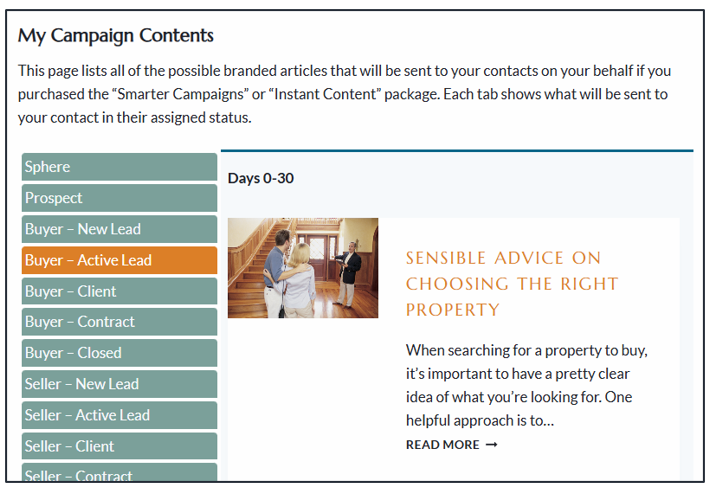
ANOTHER way to look at all your CORE Campaigns articles is by contact status. For each status (Sphere, Prospect, New Lead, Active Lead, etc), a list of articles that will be sent to your contacts with that status are shown. They aren’t necessarily in the order and don’t show the day, but…
Please note – your contacts will receive links to individual articles, not a complete list of them as shown. This web page has been created as a convenience for you to view any/all of them at once and is not intended to be shared with the general public in this format.
Content with slug launch-notice-to-contacts not found.
Understanding Status
Each campaign has been designed to anticipate your contacts’ needs and concerns at each stage of the journey. The possible stages are shown below, along with the primary motivation factor and focus behind each message. Keep in mind that, on average, 76% of your contacts already live in a home. As a result, the messages will provide varied content about:
- Homeownership, including maintenance, safety, lifestyle, DIY, and home décor.
- Real estate transaction processes include inspections, home warranty, mortgage, the buying or selling process, and marketing.
Often, the ending of each article or message includes an invitation for the reader to reach out to you with questions or next steps. This means that the status or stage of a contact is critical, as it determines which campaign/action plan/workflow the contact is assigned to. If it is not assigned correctly, the article specifically designed for that contact at that stage will not be received, and, worse, they may receive an article that doesn’t apply, thereby losing credibility and trust in you.
| Status | Motivation of the Campaign | Campaign Focus |
| Sphere | Stay in touch, Referrals, New Business. | Keep you in mind. |
| Prospect | Get their business WHEN THEY ARE READY TO BUY OR SELL. | Build trust in you to be their selected agent. |
| New Lead | Identify a current need (buy/sell). | Get ready for buying or selling. |
| Active Lead | Actively working to convert to Client. | Get them to commit, take action. |
| Client | Provide information they need as a client (setting expectations). | Keep clients on the path toward a contract. |
| Contract | Successful and smooth transaction. | Communicate with messages specific to closing and moving. |
| Closed | Keep you on their mind for future business and referrals. | Keep in touch; show you care. |
Content with slug contact-status-management not found.
Content with slug unsubscribe not found.
Your CORE Campaigns
Your new campaigns/action plans/workflows are shown below. Keep in mind that each one has an email version and a text version.
| Campaign Status | When Used | Duration | Next Campaign |
| Sphere | Someone the agent knows and has contact information. | 1080 days (3 yrs.) | Sphere, every 3 yrs. (continuous) |
| Prospect | Group of people you hope to get business from, you may or may not know(example: neighborhood farm) | 1080 days (3 yrs.) | Sphere |
| Buyer – New Lead | Someone who has indicated they want to buy. | 1080 days (3 yrs.) | New Lead, year 1 (start over) |
| Buyer — Active Lead | Someone actively looking to buy a property. | 180 days (6 mo.) | New Lead |
| Buyer – Client | Someone who has signed a Buyer’s Agreement, showing extensively or ready to offer. | 120 days (4 mo.) | Sphere |
| Buyer – Contract | Buyers who have agreed on a contract for sale. | 30 days (1 mo.) | Sphere |
| Buyer – Closed | Buyers who successfully closed a transaction with you. | 90 days (3 mo.) | Sphere + Anniversary (365) |
| Seller — New Lead | Someone who has indicated they want to sell. | 180 days (1 yr.) | Sphere |
| Seller — Active Lead | Someone actively looking to sell/list a property. | 180 days (6 mo.) | Sphere |
| Seller – Client | Someone who has signed a Listing Agreement. | 120 days (4 mo.) | Sphere |
| Seller – Contract | Sellers who have agreed on a contract for sale. | 40 days (1.5 mo.) | Sphere |
| Seller – Closed | Sellers who successfully closed a transaction with you. Note: Existing closed clients should be assigned “Sphere.” This campaign is reserved for newly closed clients. | 45 days (1.5 mo.) | Sphere + Anniversary (365) |
| Happy Anniversary | Buyers and sellers who closed a transaction with you. | Once a year for 3 years | (ends after 3 years) |
| Renter | Someone actively looking to lease a property. | 45 days (1.5 mo.) | Sphere |
| Renter – Closed | Renter you worked with who signed a lease. | 360 days (1 yr.) | Prospect |
| Holiday | All contacts receive 7 holiday and seasonal greetings in addition to any current campaigns. | Yearly | Continual |
| RenterMayBuy | Current renter who might want to buy in the future. | 120 days | Prospect |
| FSBO | Sellers are marketing their own home. | 60 days (2 mo.) | Sphere |
| Expired | Sellers whose listing expired with another agent. | 30 days (1 mo.) | Sphere |
Content with slug holiday-campaigns not found.
Content with slug status-definitions not found.
Email Templates
topCOREagent emails use the preferred HTML format for a more professional look. Emails are sent to the primary email address in the contact’s profile. While subject lines and messages will vary, your photo and email signature will display links to your email and website. When there is an article for the contact to read, there will be a short introductory message with a “READ MORE” link to the full article. The call-to-action buttons on the right allow the contact to respond to you or receive instant information.
Sample Email
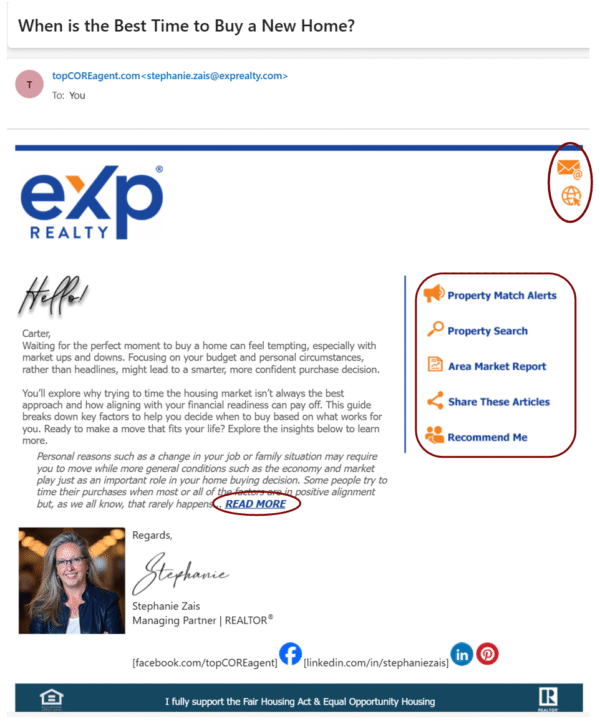
Personal Photo Appearing in Emails
While many email hosts/providers allow rich-text emails, including photos, graphics, and font variations, there may be an issue with your photo and/or logo in your signature line not appearing to all recipients. This is primarily due to the personal email settings of the recipient or the host on which their email is maintained. MyRealEstateContent.com and topCOREagent.com are not responsible for how these settings are maintained individually and cannot guarantee that your images will always appear in an email.
Call-to-Action Buttons
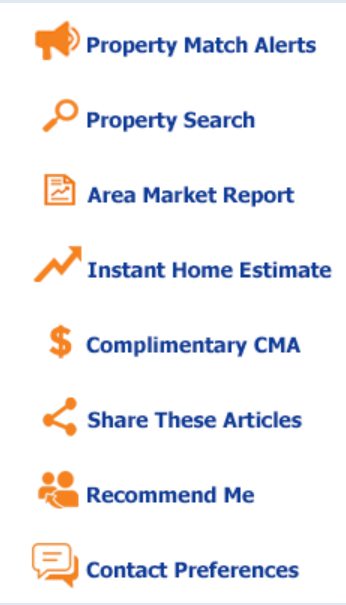
Emails for Buyer, Seller, Sphere/Prospect, and Closed have status-appropriate buttons that allow contacts to select them to obtain data directly from your website, request information for you to provide, or provide information to you like leaving a review or testimonial without your have to ask!

Multiple Uses for an Email
topCOREagent emails are used at specific times for the differing stages of a contact’s journey, depending on the subject. In some 3-year campaigns, the same email may be used again in subsequent years. Some emails are relevant for multiple contact statuses. Therefore, an email may have multiple templates to correspond to several campaigns. As a result, do not change or remove a template within a campaign, nor change any links to articles.
Unsubscribe Option
Often, there are unsubscribe options for contacts to use if there is a preference to only receive text messages or if they want to no longer receive emails. To learn who has unsubscribed or how to rectify it if possible, check with your CRM’s help section for instructions.
Content with slug call-to-actions not found.
Text Templates
Unlike emails, which allow virtually unlimited characters, text messages have a maximum of 230 characters to ensure delivery without exceeding the limits set by some providers. The text starts with greeting the contact by their first name. Next is a summary of the article, including a compelling message explaining why readers should click the article link. You are also identified. Here is a sample of the format of a text message that is sent by the system on your behalf to each contact with a phone number:
Hi, Susan! Friend or Pro for Your Home Sale? The pros & cons of using friends/family for your real estate needs: Click now: https://myrealestatecontent.com/?p=1732&email=Your.Email@Server.com Your Name, Company Name
The link URL is important for getting the contact to the correct article and agent, so don’t change it.
If a contact doesn’t want to continue receiving text messages because they prefer email only or don’t want any messages, they most commonly use STOP, opt out, or other commands. Sometimes, they want to START again and use that word. To learn how to know if a contact has unsubscribed from text messages and how to recover if possible, check the help guide in your CRM.
Notes & Rules
Both the Sphere and Prospect groups are generic in that you don’t know in advance if a person in either of those groups will become a Seller, a Buyer, or both. As a result, the content will focus on more general real estate and homeownership topics. However, Sphere and Prospect are two separate mindsets. Sphere contacts are those you know well enough to have their personal contact information. Prospects are those you likely don’t know as well as you hope to ascertain their future needs.
- A Sphere should never be moved to a Prospect, and vice versa, because once you know a contact is thinking of moving, they should be marked as a New or Active Lead.
- Once a campaign reaches its time limit with an individual, it will automatically be replaced with a new campaign. To determine which new campaign will be assigned, refer to the “Next Campaign” column in “CORE Campaigns.”
- When appropriate, change the contact’s status so that a new campaign may be applied. See “CORE Campaign” to learn when a new status should be changed.
- Campaigns will automatically start when:
- The contact’s stage is manually changed;
- A specific hashtag is assigned to a contact that triggers a campaign;
- The duration of the campaign has ended, and a new one is automatically assigned;
- A new contact is created (either manually entered or from your connected website activity that requires an email or phone number, such as a landing page or registration).
IMPORTANT NOTE: Do not manually add or remove campaigns to a contact. Instead, change their status so the campaigns automatically start and/or stop based on that status. You have the option to receive a monthly email reminder containing a link to “My Campaign Contents,” showing you all of the possible articles that may be sent to your contacts on your behalf. If you wish to receive these reminders, you may change the status of that campaign by changing it from inactive to active.
Additional Campaigns
In the future, additional campaigns may become available, some included and some for an additional fee:
Military-related
Additional Holidays
Investor
First-Time Buyer
In each email and in the Agent Banner at the top of each article are several buttons or links that give the contact the opportunity to respond to you or receive instant information. They are invaluable tools that allow contacts to receive or give something without being directly asked by you.
Social Media Sharing
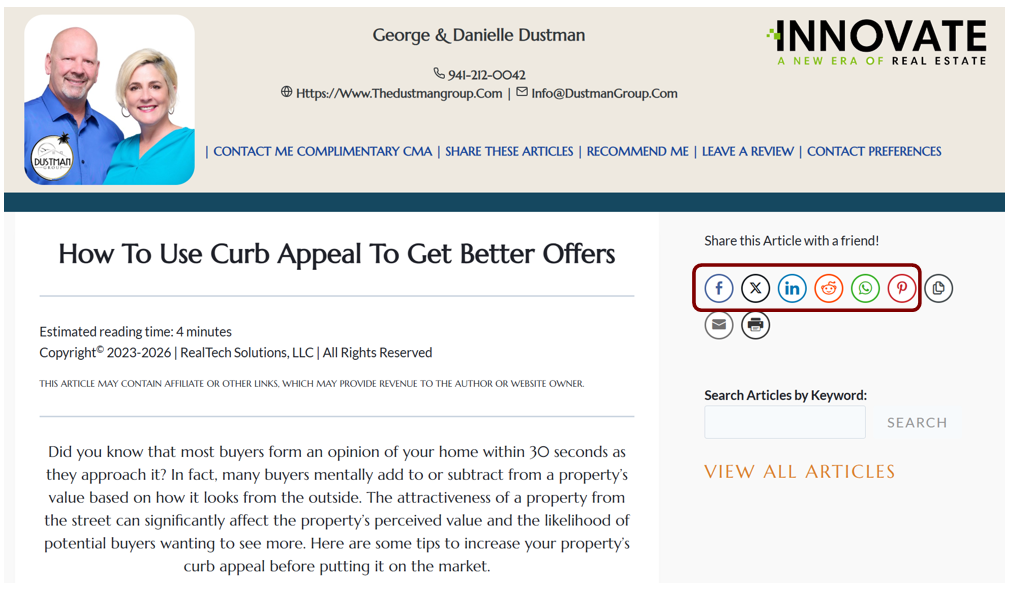
Both you and your contacts may share articles through social media. With the article open and your banner at the top, you and any contact who received it may click the social media buttons to the right of the headline to post the article, add an appropriate comment for the selected media, and share it with others. There are six social media options, plus three more — copy, print, and email, so you can email it easily to all the email addresses you have, even those outside your current contacts!
Embed Content
Embedding topCOREagent.com articles on your website is a feature of CORE Campaigns and CORE Blog. You may embed an individual article. To make it easier to embed multiple articles, use View All Articles to embed all articles in each of the four categories — Finding a Home, Selling a Home, Real Estate Market, and Home Improvement.
Guide on how to embed content with a button
Content Licensing
You are free to share part or all of these articles on social media, on your website, in emails, texts, presentations, and elsewhere. However, each article is copyrighted, so you will need to provide credit if using in any additional printed materials, such as listing or sales presentations, or in another digital format. When using additional printed materials, use this copyright notice — Copyright [Year]. All Rights Reserved. RealTech Solutions, LLC.
For more copyright information, please view our Terms and Conditions.
Hashtag Overview
importance?
how they work
Campaigns Hashtags
don’t remove tca hashtags
you can add your own! (bulk email, filtering, etc)
Hashtag Management
reference the terms of use
share part or all of an article
share externally (presentations, website, email, etc)
Content with slug create-temporary-password not found.
Content with slug reset-forgotten-password not found.
Content with slug contact-status-management not found.
Content with slug update-signature not found.
CAMPAIGNS & TEMPLATES
| Your CORE Campaigns |
| Holiday Campaigns |
| Status Definitions |
| Email Templates |
| Text Templates |
| Notes & Rules |
| Additional Campaigns |