

What Contacts Receive – GHL
What Your Contacts Receive
When your CORE Campaigns are activated, your contacts will begin receiving valuable, branded content automatically — no extra work required from you!
The First Message (Launch Notice)
The very first communication your contacts receive will be an introductory email or text, depending on their “Contacts” profile data, including “Contacts Details” settings in “DND.” This launch message introduces you as their trusted resource and explains that they’ll receive inspiring, informative articles about homeownership, real estate trends, market insights, and more — all personalized with your branding and photo.
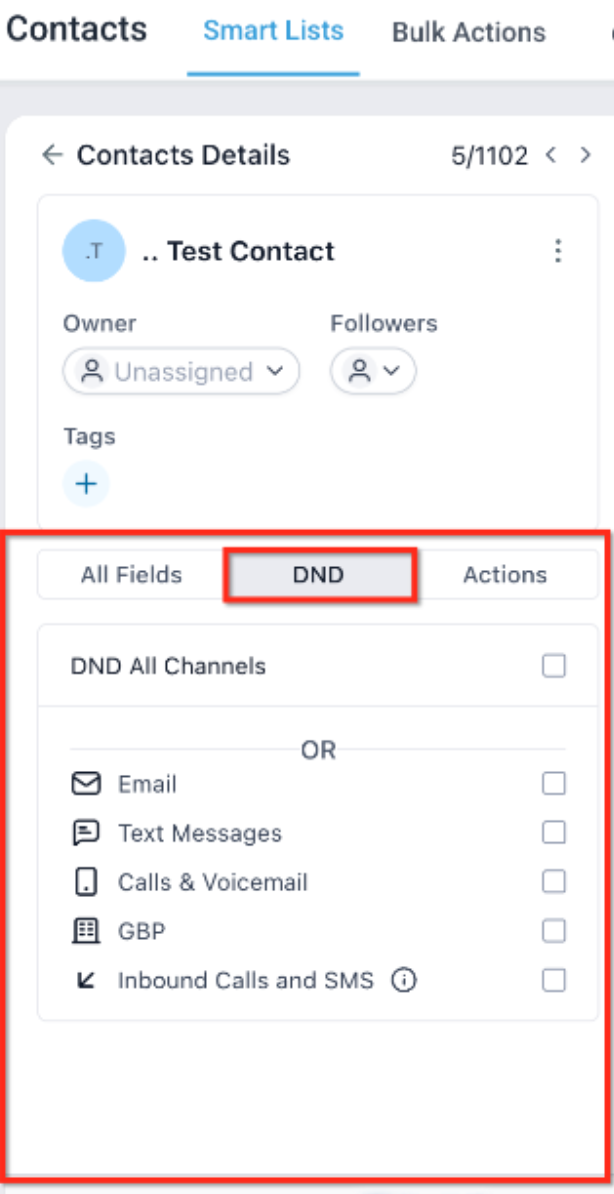
If a contact has a valid email address and the email is not checked in their “DND” settings (meaning the contact is allowed), that contact will receive an email. If their “Text Messages” is also not checked, the contact will also receive a text.
Click here to see the email and text message that will be sent on your behalf.
Communication Methods
CORE Campaigns are designed to reach your contacts through email and/or text (SMS) simultaneously, depending on each contact’s permissions.
- If the contact has both email and Text (SMS) checkboxes blank in the DND section in their profile, they will receive both the email and text versions of each campaign communication.
- Some contacts may prefer only one type of communication. There are three ways in which a customer can let you know their preference:
BUTTON IN EMAILS

In every email, there will be a button linking to a form where the contact can choose their communication preferences.
LINK IN BANNER

On your branded banner, there is a “Contact Preferences” link that takes the contact to the same communication preferences form.
SELF-SERVICE
Contacts have the option to type “Stop” in reply to any texts they may receive from you.
They may also click “Unsubscribe” at the bottom of an email. However, that will eliminate both emails AND texts. It is advised that you recommend your contacts use either of the first two, so you can modify their “Permission to Contact” settings and retain either text or email, rather than eliminating both.
These tools give your contacts control and make it effortless for them to stay connected or ask for what they need — all while keeping you top of mind.